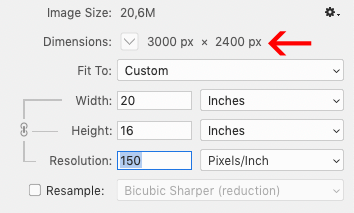
To determine whether your file is large enough for printing, you need to know its size and the ppp* (dpi) of the file.
A 16″x20″ file may be too small for an 8″x10″ print if it doesn't have enough dpi (dpi)
*Point per inch.
For quality printing, the minimum ideal is 150ppp (dpi) at desired format. If you want a 16″x20″ print, then you need a 16″x20″ file at 150ppp (dpi).
It's very important to understand the difference between resolution and file size.
A file can be 16″x20″ and have the same resolution as another 8″x10″ image! The difference will then be the dpi of the file.
Here's an example: 16″x20″ at 150ppp is the same size as an 8″x10″ at 300ppp. They have the same number of pixels: 3000×2400 pixels or 6.4 megapixels.
They are then the same size. The 16″x20″ is no better quality than the 8″x10″ and vice versa. They have the same number of pixels.
So you can't rely on file size or resolution alone. The two are interconnected. The only exact measurement, but one that is not practical in everyday use, is the number of pixels (for example: 3000 pixels x 2400 pixels).
Backing up your memories! Have you thought about backing up the photos on your phone/computer? It's something most of us neglect... until the day we lose all our pictures! A catastrophe... There are
How to choose your display at a trade show? Participating in a trade show soon? There are a number of media to choose from. Here are a few tips to help you decide. Determine your objectives It's important to
Color differences between screen and print. A little clarification on colors to get you started... We're talking here about a color space. This is a digital representation of colors in a colorimetric system or color synthesis process. Each color